


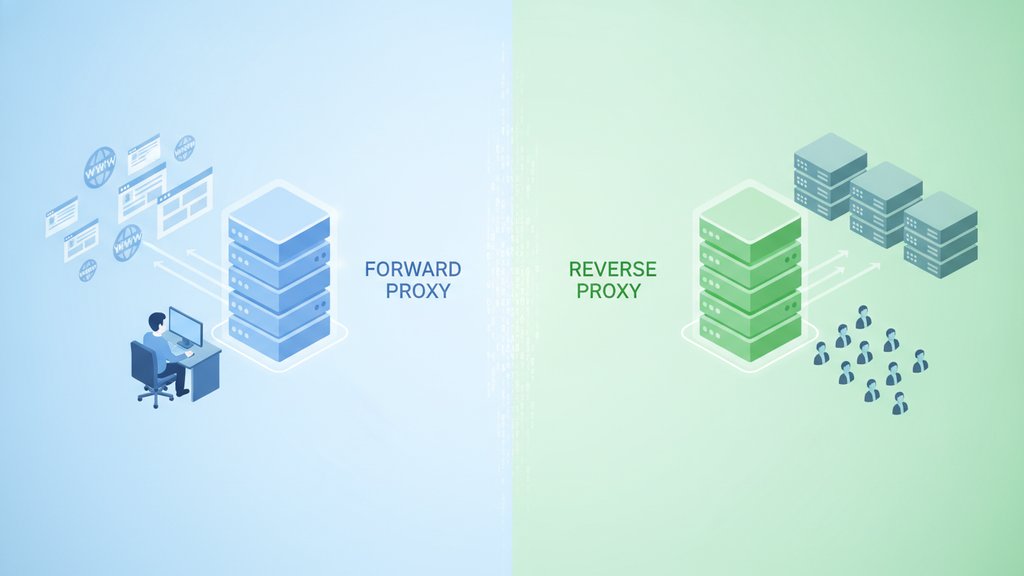
The core difference is simple: a forward proxy sits in front of clients and hides who is making requests, while a reverse proxy sits in front of servers and hides which machine actually answers those requests. When you compare a reverse proxy vs forward proxy, think of it as two ends of the same connection. One protects the person browsing, the other protects the website being browsed.
A forward proxy acts on behalf of the user (outbound traffic leaving a network), and a reverse proxy acts on behalf of the server (inbound traffic arriving at your infrastructure). That single swap in whose side the proxy is on changes everything about what each one does and when you should reach for it.
Content Table
How proxies work at a basic level
A proxy is just a middleman server. Instead of a client talking directly to a destination, the request goes to the proxy first, and the proxy passes it along. The destination sees the proxy's IP address, not the original one. That relay step is the foundation of every proxy type.
What changes is which end the middleman stands on:
- Forward proxy: stands next to the client, forwarding requests out to the wider internet.
- Reverse proxy: stands next to the server, receiving requests in from the wider internet.
The name "forward" describes traffic moving forward, away from a private network. "Reverse" describes the same relay logic pointed the opposite direction. If you understand that framing, the rest falls into place.
What a forward proxy does
A forward proxy (sometimes called an outbound proxy) intercepts traffic leaving a group of clients. The clients are usually configured to route their requests through it, either manually or through network policy. The outside world only ever sees the proxy.
Common forward proxy use cases:
- Corporate proxy server: A company routes all employee traffic through one gateway to enforce policy, block certain sites, log activity, and scan for malware.
- Content filtering: Schools and offices block social media, streaming, or adult content at the proxy level before it reaches the browser.
- Anonymous browsing proxy: Individuals hide their real IP from destination sites, giving them a degree of privacy or letting them reach geo-restricted content.
- Caching: Frequently requested pages get stored at the proxy, so repeat requests load faster and use less bandwidth.
- Access control: Only authenticated users can send traffic through, adding a checkpoint for outbound connections.
A VPN is a close cousin here. It also routes your outbound traffic through a remote server and swaps your visible IP, but it encrypts the whole tunnel rather than proxying a single application's requests.
What a reverse proxy does
So what does a reverse proxy do? It sits in front of one or more backend servers and takes all incoming requests first. Visitors think they are talking to a single server, but the reverse proxy decides which backend actually handles each request. Popular examples include NGINX, HAProxy, and Cloudflare.
The main reverse proxy benefits:
- Load balancing: A load balancing proxy spreads incoming traffic across multiple servers so no single machine gets overwhelmed.
- SSL termination: The proxy handles TLS encryption and decryption, freeing backend servers from that work.
- Caching and compression: Static assets and responses get cached and compressed at the edge, cutting response times.
- Security shield: Backend IPs stay hidden, and the proxy can filter malicious requests or absorb DDoS attempts before they reach your app.
-
Single entry point:
You can route
/apito one service and/imagesto another, all under one domain.
Reverse proxy vs forward proxy side by side
| Aspect | Forward proxy | Reverse proxy |
|---|---|---|
| Acts on behalf of | The client | The server |
| Traffic direction | Outbound (leaving the network) | Inbound (arriving at servers) |
| Who it hides | The user's IP | The backend server's IP |
| Who configures it | Clients or network admins | Server or infrastructure owner |
| Typical goal | Privacy, filtering, access control | Load balancing, security, performance |
| Visitor is aware? | Usually yes (configured client) | Usually no (transparent) |
When to use each one
Pick based on which side of the connection you are trying to help.
Reach for a forward proxy when you want to:
- Control or monitor what leaves your network (a classic corporate proxy server setup).
- Filter or block content for a group of users.
- Hide client IPs for privacy or anonymous browsing.
- Cache outbound requests to save bandwidth.
Reach for a reverse proxy when you want to:
- Distribute traffic across several backend servers.
- Add a security layer in front of your web app.
- Offload TLS, caching, or compression from your servers.
- Serve multiple services under one clean domain.
Plenty of setups run both. A company might route employee traffic through a forward proxy on the way out, while its public website sits behind a reverse proxy on the way in. They never conflict because they operate on different ends of the connection.
How to tell if traffic is behind a proxy
Whether you run a login page, a signup form, or an e-commerce checkout, it helps to know when a visitor is hiding behind a proxy or VPN. Proxies often leave traces in HTTP headers like
X-Forwarded-For,
Via, and
X-Real-IP, which can reveal that a request passed through an intermediary.
You can also check an IP against known proxy, VPN, and TOR exit node data to gauge how anonymous a connection really is. That is useful for fraud screening, moderation, or simply understanding your traffic.

Check if an IP is using a proxy, VPN, or TOR
When you need to know whether a connection sits behind a forward proxy or an anonymous browsing proxy, our Proxy Check tool detects proxy, VPN, and TOR usage and shows ISP, organization, and location details in seconds.
Check an IP address →
Not exactly, though they overlap. Every load balancer is a form of reverse proxy, but a reverse proxy can do much more, such as SSL termination, caching, and request filtering. Load balancing is one job among several that a reverse proxy handles for incoming traffic.
Yes, and it is common. A forward proxy manages outbound traffic from your users, while a reverse proxy manages inbound traffic to your servers. They sit on opposite ends of the connection, so they never compete. Many networks run both without any conflict.
Yes. Visitors only see the reverse proxy's IP, not your backend servers. This shields your infrastructure from direct attacks and makes it harder for attackers to target a specific machine. It is one of the main security reasons teams put a reverse proxy in front of their apps.
A VPN behaves like a forward proxy in that it routes your outbound traffic through a remote server and changes your visible IP. The key difference is that a VPN encrypts your entire connection at the network level, while a forward proxy typically handles specific application traffic without full encryption.
Look for proxy headers like X-Forwarded-For or Via in the request, and check the visitor's IP against databases of known proxy, VPN, and TOR nodes. Our Proxy Check tool combines both signals, flagging proxy, VPN, and TOR connections along with ISP and location data.