

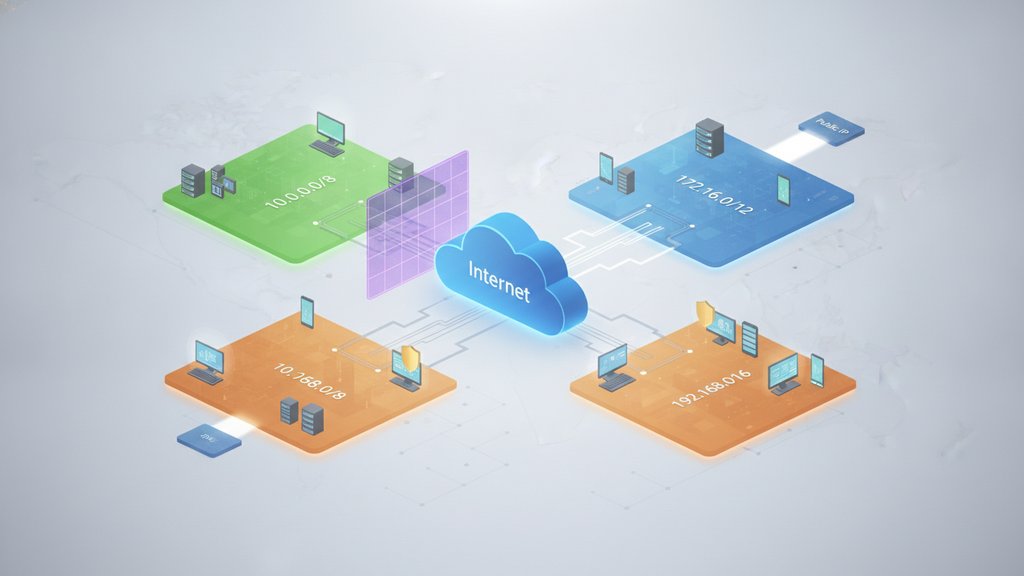
Private IP address ranges are blocks of IPv4 addresses set aside for use inside local networks, and they never appear directly on the public internet. There are three of them defined by
RFC 1918:
10.0.0.0
to
10.255.255.255,
172.16.0.0
to
172.31.255.255, and
192.168.0.0
to 192.168.255.255. They exist because IPv4 only has about 4.3 billion addresses, so reusing the same private ranges behind every router lets billions of devices share the limited pool without collisions.
Content Table
The three private IP address ranges
The Internet Engineering Task Force reserved three chunks of IPv4 space for private use in RFC 1918. Each block is a different size, which makes each one suited to different network scales.
| Range | CIDR | Total addresses | Typical use |
|---|---|---|---|
| 10.0.0.0 – 10.255.255.255 | 10.0.0.0/8 | ~16.7 million | Large enterprises, cloud VPCs |
| 172.16.0.0 – 172.31.255.255 | 172.16.0.0/12 | ~1 million | Mid-size networks, Docker defaults |
| 192.168.0.0 – 192.168.255.255 | 192.168.0.0/16 | 65,536 | Home routers, small offices |
The
192.168 address
block is the one most people recognize because home routers hand out addresses like 192.168.1.1 or 192.168.0.1 by default. The 10.0.0.0 range is the largest and shows up in big corporate networks and cloud environments where thousands of machines need their own local IP address. The 172.16 block sits in the middle and is a common default for container platforms.
Why private ranges exist
IPv4 addresses are 32 bits long, which caps the total at 4,294,967,296 unique addresses. That sounded like plenty in the early 1980s, but with billions of phones, laptops, servers, and smart devices online, the world ran out of fresh public IPv4 blocks years ago.
Private ranges solve this by letting the same addresses be reused endlessly:
-
Reuse without conflict.
Your neighbor's router and yours can both use
192.168.1.10because those addresses only mean something inside each home network. - Conservation. An entire office of 200 computers can share a single public IP instead of consuming 200 public addresses.
- Isolation by default. A device with only a private address cannot be reached directly from the internet, which adds a basic layer of protection.
These ranges are a stopgap. The real long-term fix is IPv6, with its vastly larger address space, though adoption has been gradual. If you're curious why the switch is taking so long, our breakdown of the state of IPv6 adoption explains the holdups.
How private IPs reach the internet
A device with a private IP can't talk to a website on its own, so your router performs Network Address Translation (NAT). Here's the flow:
-
Your laptop (say
192.168.1.24) sends a request to a website. - Your router swaps the private source address for its single public IP before the packet leaves your network.
- The website replies to the public IP.
-
The router remembers which internal device made the request and forwards the reply back to
192.168.1.24.
NAT is also the reason you sometimes can't reach your own server using its public domain name from inside your network. That specific quirk is covered in our guide on why NAT loopback trips people up. And if you've noticed your public address shifting over time, our article on why your IP address keeps changing explains what your ISP is doing behind the scenes.
How to tell if your IP is private
Check the first numbers of any IPv4 address against these rules:
-
Starts with
10.→ private -
Starts with
192.168.→ private -
Starts with
172.16.through172.31.→ private (note:172.15.x.xand172.32.x.xare public) -
Anything else (like
203.0.113.5) → public
The 172 range trips people up most, because only 16 of the 172 blocks are private.
172.20.5.1
is private, but
172.40.5.1
is a normal public address.
Other reserved ranges worth knowing
Beyond the three RFC 1918 blocks, a few other special ranges show up on real networks and aren't routable on the public internet either:
| Range | Name | What it's for |
|---|---|---|
| 127.0.0.0/8 | Loopback |
127.0.0.1
always points back to your own machine
|
| 169.254.0.0/16 | Link-local (APIPA) | Auto-assigned when a device can't reach a DHCP server |
| 100.64.0.0/10 | Carrier-grade NAT | Used by ISPs to share public IPs among many customers |
Seeing a
169.254.x.x
address usually means something went wrong, your device tried to get an IP automatically but no DHCP server answered. The carrier-grade NAT range (defined in
RFC 6598) is increasingly common because ISPs have run so low on public IPv4 that they now put multiple customers behind a shared address, a second layer of NAT on top of your home router's.

See the public IP behind your private network
Your devices use private IP address ranges internally, but the world sees one public address. Our What Is My IP tool instantly shows that public IP plus its location, ISP, and ASN.
Check my IP address →
Yes, and that's the whole point. Millions of home networks all use
192.168.1.1
for their router at the same time. Since private addresses only have meaning inside their own local network, there's no conflict as long as they stay behind separate routers and NAT.
The 192.168 address is your local IP, assigned by your router for use inside your home. When you visit a site, your router translates that private address into its single public IP using NAT. Websites only ever see the public address, never your internal one.
Only the range from
172.16.0.0
to
172.31.255.255
is private. That's 16 blocks out of the full 172 space. Addresses like
172.15.0.1
or
172.33.0.1
fall outside the private range and are treated as normal public IPs.
IPv6 has a similar concept called Unique Local Addresses in the
fc00::/7
block, usually seen as
fd00::/8. However, because IPv6 has so many addresses, most devices get a globally routable address and rely less on NAT than IPv4 networks do.
Yes. All three RFC 1918 ranges are free to use however you like inside your network. Home users typically stick with 192.168, while larger setups pick 10.0.0.0 for its huge address space. Just avoid overlapping ranges if you connect two networks with a VPN.