

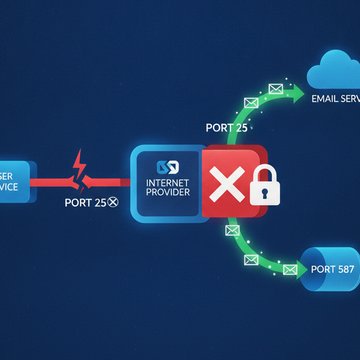

If your emails suddenly stopped sending from a script, a home server, or a mail application, there's a good chance your SMTP port is blocked by your ISP. Most residential internet providers block outbound TCP port 25, the traditional port for sending mail server to server, to fight spam and botnets. The fix is almost always to switch your outgoing mail to port 587 with authentication, or route through an SMTP relay.
Below is exactly why this happens, how to confirm it, and the practical ways around it that actually work in 2026.
Content Table
Why ISPs Block Port 25
Port 25 is where mail servers talk to each other to hand off email. It has no built-in requirement for a username and password, which made it a favorite tool for malware. An infected home PC could quietly pump out thousands of spam messages directly on port 25 without the owner ever noticing.
To stop that, ISPs and cloud providers block outbound connections on port 25 from ordinary customer connections. This is a long-standing anti-abuse practice recommended in IETF RFC 5068, which spells out that end users should submit mail on the submission port, not port 25.
- Residential providers (Comcast, AT&T, Verizon, Spectrum) block port 25 outbound by default.
- Cloud providers like AWS, Google Cloud, and Azure block or throttle port 25 on new accounts unless you request an exception.
- The block is usually one-directional. You typically can't make outbound port 25 connections, even though incoming mail on your own server may still work.
How to Confirm Port 25 Is Blocked
Before you rearchitect anything, verify the block actually exists. Symptoms usually look like connection timeouts (not refusals) when your app tries to reach a mail server on port 25.
The cleanest test is to check whether an outbound connection to port 25 succeeds against a known-good mail host. You can use our open port checker to test whether port 25 is reachable on a public mail server, then compare it to the same server on port 587. If 587 responds and 25 times out, your ISP is filtering port 25.
You can also test from your own machine with a command-line tool:
nc -vz smtp.gmail.com 25
nc -vz smtp.gmail.com 587
A timeout on 25 with a success on 587 is the tell-tale signature of an ISP block. If you're unsure how to read connection responses, our ping tool shows the difference between a timeout and an active refusal.
Port 25 vs 587 vs 465
These three ports all move email, but they serve different roles. Mixing them up is the most common reason mail setups fail.
| Port | Purpose | Encryption | Blocked by ISPs? |
|---|---|---|---|
| 25 | Server-to-server relay (MTA to MTA) | Optional STARTTLS | Yes, almost always outbound |
| 587 | Mail submission by users/apps | STARTTLS, requires auth | Rarely blocked |
| 465 | Mail submission (implicit TLS) | TLS from the start | Rarely blocked |
The short rule: use port 25 only between mail servers. If your app, script, or email client is sending mail, it should use port 587 (or 465) with a username and password. That's exactly what the submission port was designed for.
How to Fix a Blocked SMTP Port
You don't need your ISP to unblock port 25. In nearly every case, the correct fix is to stop using port 25 for outbound submission. Pick whichever matches your situation:
- Switch your app or client to port 587. Update the SMTP settings to point at your provider's submission server on port 587 with STARTTLS and your login credentials. This solves the problem for almost all email clients and application code.
- Use an SMTP relay service. A relay accepts your mail on port 587 (or 465), authenticates you, then handles the actual port 25 delivery to recipient servers from its own trusted IPs. This also boosts email deliverability because relays maintain warm, reputable sending IPs.
- Request an exception (cloud only). On AWS, Google Cloud, or Azure you can sometimes request that port 25 be unblocked for a specific instance, but they rarely grant it, and 587 through a relay is faster.
What This Means for Self-Hosted Mail Servers
If you're trying to run your own mail server at home or on a fresh VPS, a blocked port 25 is only the first hurdle. Even after you get outbound delivery working through a smart host, your sending IP's reputation determines whether messages arrive.
- Check your IP against blocklists. Residential and new cloud IPs are frequently listed. Our IP blacklist checker shows whether major spam databases already flag your address.
- Set up SPF, DKIM, and DMARC. Without these authentication records, most inboxes silently drop your mail. Validate your setup with our SPF checker , DKIM checker and DMARC checker before you rely on the server.
- Add a matching reverse DNS record. Many receiving servers reject mail from an IP with no PTR record pointing back to your sending hostname. Confirm yours with our reverse DNS lookup .
- Route outbound through a relay anyway. Even self-hosters usually send through a relay or smart host on port 587, because delivering directly on port 25 from a small IP block is a losing battle against reputation filters.
If part of your struggle is reaching your own server at all from inside your network, that's a separate networking quirk. Our explainers on how port forwarding works cover exposing services correctly, which matters far more for inbound mail (port 25 in) than for outbound submission.
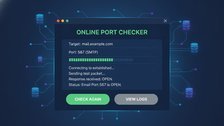
Confirm your SMTP port is blocked in seconds
Not sure if your ISP is really blocking port 25? Test port 25 against any mail server and compare it to port 587 to prove the block instantly.
Check a port now →
ISPs block outbound port 25 to stop infected home computers from sending spam directly to mail servers. Port 25 requires no authentication, so it was heavily abused by botnets. The block is standard anti-spam policy and applies to nearly all residential and many cloud connections by default.
Some ISPs will unblock it for business accounts, but most refuse for residential plans. Even if they agree, sending directly on port 25 from a home IP usually fails spam filters. Switching to port 587 with authentication or using an SMTP relay is faster and far more reliable.
Port 25 is for server-to-server email relay and needs no login. Port 587 is the submission port for users and apps, requiring a username and password plus STARTTLS encryption. Apps and email clients should always use 587, not 25, which is why 587 is rarely blocked.
Usually yes. A relay sends from established IPs that recipient servers already trust, and it handles the port 25 delivery for you. Your own sending IP can still hurt deliverability , so check it against the blocklists.
Not always, but from a home or fresh cloud connection it is the most likely cause. Compare it with port 587 on the same mail server: if 587 connects and 25 times out, your ISP is filtering outbound port 25. If both time out, suspect the destination host or your own firewall instead.