



On this page
- Subnetting a subnet: what does it mean?
- How IP subnetting borrows host bits
- How to split a /24 into smaller subnets
- How many network subnets and hosts does each prefix give?
- Can subnets of one network be different sizes?
- Why use network subnetting at all?
- Which IP addressing and subnetting mistakes cause overlaps?
- How to check your subnets with a calculator
- Frequently asked questions
Subnetting a subnet: what does it mean?
Subnetting a subnet is the act of dividing an existing subnet into smaller ones by making its prefix longer. A /24 becomes two /25s, four /26s or eight /27s. Any of those can be divided again, as long as host bits are left to borrow.
Nothing special happens the second time. A prefix is only a line between network bits and host bits. Move the line one bit to the right and the block splits in half. Whether the block you started with was already carved out of something bigger makes no difference to the math.
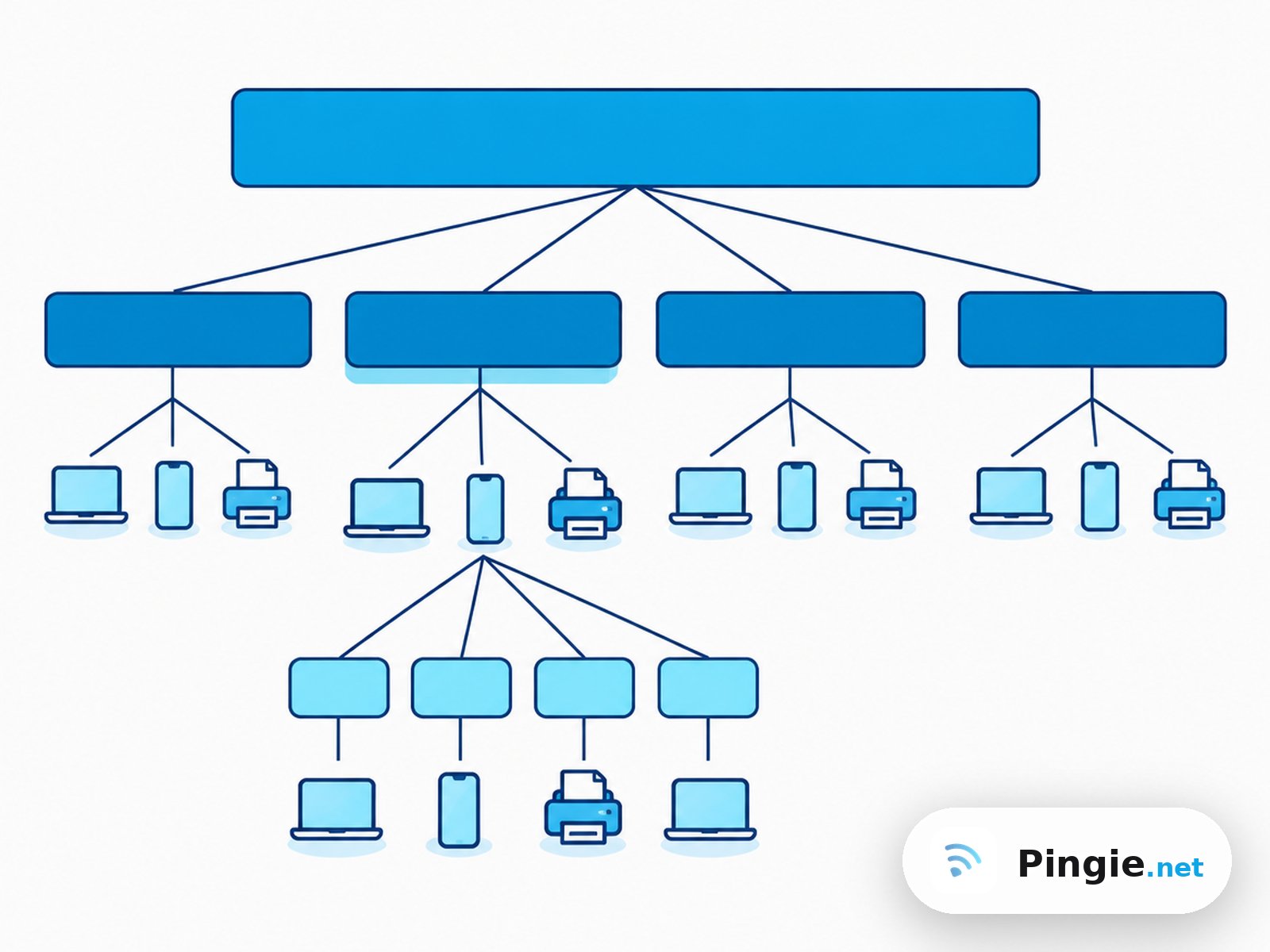
Here is 192.168.10.0/24 split into four /26 subnets, and then one of those /26 subnets split again into four /28 subnets:
The examples use 192.168.10.0/24, which sits inside one of the private IP address ranges, so you can try all of this on a home or lab network.
How IP subnetting borrows host bits
An IPv4 address has 32 bits. The prefix length says how many of them name the network. The rest number the hosts inside it. A /24 has 24 network bits and 8 host bits.
To split the block, you take bits from the left edge of the host part and treat them as network bits. Going from /24 to /26 borrows 2 bits:
/24  11111111.11111111.11111111.00000000  255.255.255.0
/26  11111111.11111111.11111111.11000000  255.255.255.192
/28  11111111.11111111.11111111.11110000  255.255.255.240
Two rules cover everything that follows:
- Number of subnets = 2 to the power of the borrowed bits. Borrow 2 bits and you get 4 subnets.
- Block size = 2 to the power of the host bits that remain. A /26 leaves 6 host bits, so each subnet holds 64 addresses.
In each subnet the first address is the network address and the last is the broadcast address. Neither goes on a device, so usable hosts are the block size minus 2. A /26 gives 62.
Shortcut for the block size: subtract the last non-255 octet of the mask from 256. For 255.255.255.192 that is 256 minus 192, which is 64.
How to split a /24 into smaller subnets
Follow the same five steps every time, whatever the starting prefix is.
- Decide what you need
Either a number of subnets or a number of hosts per subnet. Count hosts generously: the gateway needs an address too.
- Pick the new prefix
Borrow enough bits to cover the subnet count, then confirm the host bits left over still fit your largest group.
- Work out the block size
2 to the power of the remaining host bits, or 256 minus the mask octet.
- List the network addresses
Start at the original network address and keep adding the block size until you reach the end of the original block.
- Fill in broadcast and host range
Broadcast is one below the next network address. Usable hosts are everything in between.
Example: subnetting network 192.168.10.0/24 into four
You need four subnets. Two borrowed bits give exactly four, so the new prefix is /26 and the mask is 255.255.255.192. Six host bits remain, so the block size is 64.
Count up in steps of 64 from .0:
| Subnet | Network address | First usable host | Last usable host | Broadcast address |
|---|---|---|---|---|
| 1 | 192.168.10.0/26 | 192.168.10.1 | 192.168.10.62 | 192.168.10.63 |
| 2 | 192.168.10.64/26 | 192.168.10.65 | 192.168.10.126 | 192.168.10.127 |
| 3 | 192.168.10.128/26 | 192.168.10.129 | 192.168.10.190 | 192.168.10.191 |
| 4 | 192.168.10.192/26 | 192.168.10.193 | 192.168.10.254 | 192.168.10.255 |
Each subnet has 64 addresses and 62 usable hosts. Together they cover all 256 addresses of the /24 with no gap and no overlap.
How to subnet one of those subnets again
Say subnet 2, 192.168.10.64/26, is for four small device groups. Borrow 2 more bits: /26 becomes /28, the mask becomes 255.255.255.240 and the block size drops to 16.
This time start counting at .64, the network address of the block you are dividing, and stop at .127, its broadcast address:
| Network address | Usable host range | Broadcast address | Usable hosts |
|---|---|---|---|
| 192.168.10.64/28 | .65 to .78 | 192.168.10.79 | 14 |
| 192.168.10.80/28 | .81 to .94 | 192.168.10.95 | 14 |
| 192.168.10.96/28 | .97 to .110 | 192.168.10.111 | 14 |
| 192.168.10.112/28 | .113 to .126 | 192.168.10.127 | 14 |
The other three /26 subnets are untouched. That is the point of splitting a subnet instead of renumbering the whole network: the change stays inside one block.
Check a subnet in secondsEnter an address and a prefix to see its network, broadcast and host rangeHow many network subnets and hosts does each prefix give?
Starting from a single /24, these are the options. Every extra bit doubles the subnets and halves the block.
| New prefix | Subnet mask | Bits borrowed | Subnets from a /24 | Addresses per subnet | Usable hosts |
|---|---|---|---|---|---|
| /25 | 255.255.255.128 | 1 | 2 | 128 | 126 |
| /26 | 255.255.255.192 | 2 | 4 | 64 | 62 |
| /27 | 255.255.255.224 | 3 | 8 | 32 | 30 |
| /28 | 255.255.255.240 | 4 | 16 | 16 | 14 |
| /29 | 255.255.255.248 | 5 | 32 | 8 | 6 |
| /30 | 255.255.255.252 | 6 | 64 | 4 | 2 |
The same pattern holds for any starting prefix. Splitting a /16 into /20s borrows 4 bits and gives 16 subnets of 4,096 addresses each. When the split falls in the third octet, the block size applies to that octet: a /20 has a mask of 255.255.240.0, so networks step by 16 in the third octet (10.0.0.0, 10.0.16.0, 10.0.32.0 and so on).
RFC 1878 lists every IPv4 prefix with its mask and address count if you want a full reference table.
Can subnets of one network be different sizes?
Yes. This is variable length subnet masking, or VLSM, and it is how most real networks are planned. Instead of cutting a block into equal pieces, you give each segment a prefix that matches its size. It works because of classless addressing, described in RFC 4632, where every route carries its own prefix length.
Suppose 192.168.10.0/24 has to serve 100 office devices, 50 phones, 20 printers and two router to router links. Four equal /26 subnets would fail: 62 hosts is too few for the office.
Sort the needs from largest to smallest and allocate in that order:
| Segment | Hosts needed | Subnet | Address range | Usable hosts |
|---|---|---|---|---|
| Office | 100 | 192.168.10.0/25 | .0 to .127 | 126 |
| Phones | 50 | 192.168.10.128/26 | .128 to .191 | 62 |
| Printers | 20 | 192.168.10.192/27 | .192 to .223 | 30 |
| Link A | 2 | 192.168.10.224/30 | .224 to .227 | 2 |
| Link B | 2 | 192.168.10.228/30 | .228 to .231 | 2 |
Addresses .232 to .255 stay free for later. Going largest first matters because a big block can only start on a multiple of its own size. Place the small ones first and you can end up with enough free addresses in total but no aligned space for the large block.
Why use network subnetting at all?
One flat network works until it does not. Splitting it gives you:
- Smaller broadcast domains. Broadcast traffic stays inside its own subnet instead of reaching every device.
- A place to apply rules. Traffic between subnets crosses a router or firewall, so you can filter guests away from servers or cameras away from laptops.
- Less waste. A link between two routers needs 2 addresses, not 254.
- Easier troubleshooting. An address tells you which segment a device is in.
- Shorter routing tables. Subnets carved from one block can be advertised upstream as that single block.
The original case for the technique is laid out in RFC 950, the standard that introduced subnets to IPv4.
Which IP addressing and subnetting mistakes cause overlaps?
Most broken plans come from a handful of errors.
- Starting a subnet off its boundary. 192.168.10.100/26 is not a network address. A /26 can only start at .0, .64, .128 or .192. The address .100 is a host inside 192.168.10.64/26.
- Forgetting the two reserved addresses. A /29 has 8 addresses but only 6 hosts. Add the gateway and you have 5 left for devices.
- Reusing a parent block. Once 192.168.10.64/26 is split into /28s, you cannot also assign the /26 itself to an interface. It overlaps all four children.
- Sizing for today. A segment with 28 devices fits a /27 on paper, with 30 usable hosts. Two new devices later it is full.
- Mismatched masks on one segment. If one host uses /26 and its neighbour /24, they disagree on who is local and some traffic never arrives.
- Leaving DHCP behind. Each new subnet needs its own scope and gateway. If addresses seem to shift after a change, see why an IP address keeps changing.
Quick overlap test: write down the first and last address of every subnet in order. Each range must start exactly one address after the previous one ends, or later. If two ranges share any address, the plan overlaps.
How to check your subnets with a calculator
Hand math is worth learning, and worth double checking. The Pingie IP Subnet Calculator has two fields: an IPv4 address, and a subnet mask or CIDR prefix. Press Calculate and it shows the details of that one subnet.
To verify the third /28 from the example above, enter:
IP address:     192.168.10.100
Subnet / CIDR:  /28
You do not have to type the network address. The calculator works out which subnet the address belongs to, so any host address inside it gives the same answer. Here it returns network address 192.168.10.96, broadcast address 192.168.10.111, first usable host 192.168.10.97, last usable host 192.168.10.110, 14 usable hosts, 16 total IPs, subnet mask 255.255.255.240 and wildcard mask 0.0.0.15. It also shows the CIDR notation and the network class.
That makes it a fast way to answer the question behind most subnet mistakes: which subnet is this address really in?
A few things to know before you rely on it:
- Type the slash. A prefix must be entered as /28. Without the slash the field is read as a dotted mask, so type either /28 or 255.255.255.240.
- One subnet per calculation. It does not list all the subnets a block splits into. Work out the block size yourself, then check each network address in turn.
- IPv4 only. Prefixes from /0 to /32 are accepted. IPv6 prefixes are not.
- /31 and /32 show 0 usable hosts. The tool always subtracts the network and broadcast address. For a /31 on a point to point link, see the FAQ below.
- Invalid masks are rejected. A mask such as 255.255.255.100, whose bits are not a continuous run of ones, returns an error.
The calculation runs in your browser with JavaScript, so the addresses you type are not sent to a server.

Not sure your new subnets line up?
Enter any IPv4 address with its prefix or mask and see the network address, broadcast address, host range and host count for that subnet.
Frequently asked questions
Yes. Any block with host bits left can be divided again by lengthening its prefix. A /24 can become /26 subnets, and one of those can become /28 subnets. The only rules are that the new blocks stay inside the parent's range and that you stop using the parent prefix once its children are in use.
A /24 has 8 host bits, so you can lengthen the prefix up to 8 times, down to a /32 that describes a single address. In practice /30 is the smallest subnet with usable hosts under the classic rules, giving 64 subnets of 2 hosts each. A /31 is possible on point to point links only.
On a point to point link, yes. RFC 3021 allows both addresses of a /31 to be assigned to the two ends of the link, with no network or broadcast address reserved. Both devices must support it. On an ordinary shared segment a /31 does not work, and many calculators report 0 usable hosts for it.
Subnetting divides a network into smaller blocks. With fixed length subnetting every block has the same prefix, such as four /26 subnets. VLSM, variable length subnet masking, lets blocks from the same parent have different prefixes, such as one /25, one /26 and several /30 subnets, so each segment gets a size that fits.
Find the block size from the prefix, then find the largest multiple of it that does not exceed the host octet. For 192.168.10.100/28 the block size is 16, and the largest multiple at or below 100 is 96, so the subnet is 192.168.10.96/28. A subnet calculator gives the same answer from the address and prefix.